
Why SMS compliance matters
SMS compliance is optional. Patcher gives every business a shared sender number that’s already registered with carriers and ready to use — you can keep sending from it indefinitely with no setup on your end. You only need to complete compliance if you want a dedicated phone number for your business, so customers see a local area code unique to your team on every text.
This article explains the rules behind SMS sending in the United States, what Patcher handles for you on the shared number, and what changes if you choose to register your own.
Why SMS rules exist
Text messages to customers in the United States are governed by two overlapping frameworks:
- A2P 10DLC — the carrier program that registers every business sending application-to-person texts over long-code numbers. Carriers use this registration to decide whether your messages deliver, get filtered, or get blocked.
- TCPA — the Telephone Consumer Protection Act, a U.S. law that requires clear consent before a business sends certain types of messages, and a working way for recipients to opt out.
The practical impact: any number sending business texts has to be registered to a real legal entity, tied to an approved use case, and backed by proof that recipients agreed to receive messages. Unregistered numbers get filtered, suspended, or worse.
The default path: send from Patcher’s shared number
By default, every business in your organization sends proposals, reschedule invitations, and other customer messages from a Patcher-managed number that’s already registered. You don’t fill out any forms, you don’t wait on carrier review, and you don’t need to manage the compliance side at all — Patcher handles registration, opt-out keywords, and the public compliance page on the shared number’s behalf.
This is the right choice for most businesses, especially when you’re first getting started.
The opt-in path: register your own dedicated number
If you’d rather have customers see a phone number that’s unique to your business — for example, a local area code matching your service area — you can complete carrier compliance for your own dedicated number. This is what the rest of this section calls “SMS compliance.”
To start the setup flow, reach out to Patcher support. Compliance setup is gated until our team enables it in your account. Once it’s on, you’ll see a Compliance section in your organization and business settings where you can complete the registration steps.
What Patcher handles for you (on either path)
Whether you’re on the shared number or your own:
- STOP, START, and HELP keywords are honored automatically on every number Patcher sends from.
- Opt-out enforcement — once a customer opts out, Patcher stops sending them messages from that number.
- Privacy and terms links are submitted with the carrier registration so reviewers can verify your disclosures.
If you complete dedicated-number setup, Patcher additionally:
- Packages your business and brand registration for the TrustHub profile and brand submission carriers require, and tracks the review state.
- Generates the campaign paperwork for your messaging use case — opt-in and opt-out language, help keywords, and sample messages.
- Hosts a public compliance page for your business at a unique URL with your program summary, privacy policy, terms and conditions, and consent proof. Carriers and reviewers can check it any time.
What you are responsible for (if you set up your own number)
Some parts of compliance only you can answer for, because they come from how your business actually operates:
- Collecting real consent. Before Patcher texts a customer, that customer needs to have agreed to receive messages from your business — for example, on an intake form, a booking page, or a signed service agreement. The consent language should say who is messaging them and what kind of messages to expect.
- Keeping proof of consent. You should be able to show, on request, how and when each customer opted in. Patcher surfaces a Consent Proof section on your public compliance page where you can describe your opt-in flow and upload screenshots of it.
- Accurate business information. The legal name, address, EIN, and contact details you enter during registration must match what is on file with your state and the IRS. Mismatches are the most common reason a brand registration is rejected.
- Message content that matches your use case. The sample messages you submit should reflect the kind of texts Patcher will actually send on your behalf. If your real traffic drifts away from that use case, your campaign can be flagged.
- Respecting opt-outs outside Patcher. If a customer asks your staff directly to stop texting them, make sure that request is reflected in any system you use, not just Patcher.
- Reviewing your own legal obligations. Rules can vary by state and by industry, and they change over time. For anything specific to your business, consult your own legal counsel.
How to opt in
- Contact Patcher support and ask to enable SMS compliance setup for your business.
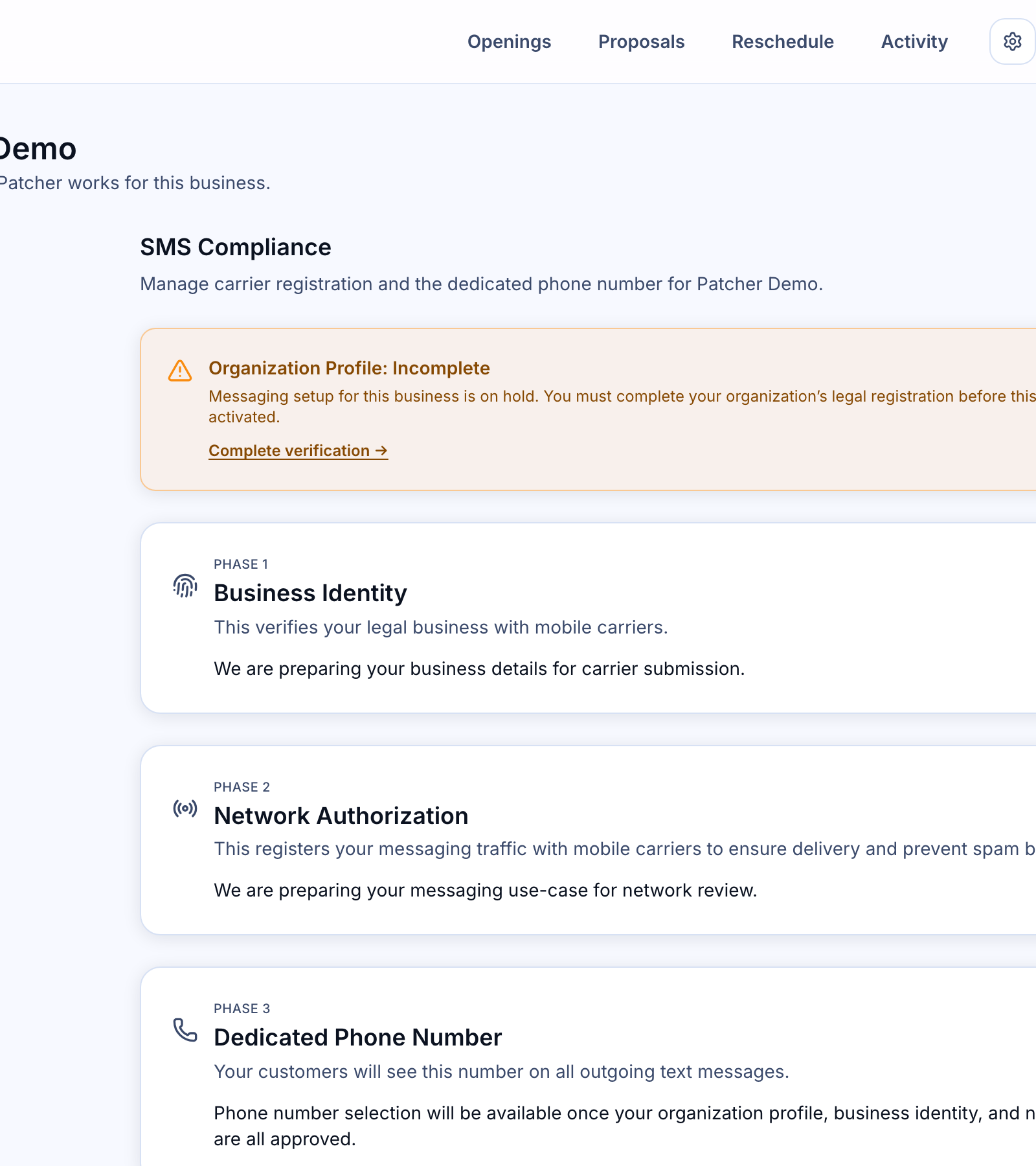
- Once it’s enabled, open Settings → Compliance.
- Fill in your Business Identity card with your legal business name, address, EIN, and website.
- Complete the Network Authorization card, which captures your messaging use case, sample messages, and consent details.
- Review and submit. Patcher tracks the review state on the same page and updates it automatically when the carrier network responds.
- After approval, you can claim a dedicated phone number and turn on local sending.
[SCREENSHOT: Business Identity card with legal name, address, and EIN fields]
A note on legal advice
This article explains how Patcher supports SMS compliance at a high level. It is not legal advice. For questions about how TCPA, state-level messaging laws, or industry-specific rules apply to your business, consult your own legal counsel.
Related articles
- Setting up SMS compliance for your business